



In the Agent era, many professional AI terms that were once niche are now becoming familiar to the general public. For example, “token”—a term whose translation sparked widespread debate—has even become a new measure of “digital wealth.” Besides tokens, another widely known term is “Context,” along with the popular concept of “Context Engineering” that emerged last year.
Simply put, a context window is all the input content that a large language model can see at once when preparing its next output. When using Claude Code in daily work, one of the most important things to understand is context management. Claude Code’s context usually includes system prompts, the CLAUDE.md file, the current conversation, every tool call and its output, and every file that has been read.
Before Claude Opus 4.6, Claude’s model had a context window of only 200k tokens. Back then, to maintain Claude Code’s performance, I tried many methods to save context space: for example, turning off auto-compact could save about 40k tokens, disabling or deleting unused MCP tools, and keeping the CLAUDE.md document as concise as possible.
After Claude Opus 4.6, Claude’s context window was upgraded to 1 million tokens—and suddenly, we had plenty of space to work with. Last week, Anthropic published an official blog post specifically about managing Sessions and the 1M Context in Claude Code. This gave me a deeper understanding of context management for Claude Code, so it’s worth writing a detailed interpretation.
Key Concepts to Understand First
What is Context Rot?
The 5 Context Management Methods in Claude Code
1.Continue: The Easiest Operation
The most natural action is to “Continue.” If you’ve just finished a round of a task, and the context still contains useful file reads and tool outputs, continuing the conversation to ask about the next step is the most convenient choice.
The official principle is clear: if the content in the context is still useful, don’t change it. Switching to compact or clear will require the model to rebuild the context, which wastes time and resources. To decide whether to continue, just ask yourself one question: Is the information I need for the next step still in the current context? If yes, continue.
For example, if you just asked Claude to read a code file and analyze its structure, and now you want to ask it to optimize a specific function in that file, continuing the conversation is perfect—all the information about the code file is already in the context, so Claude doesn’t need to re-read it.
2.Rewind: Better Than Trying Again
This part is what I think is the most worth reading in the entire blog post. In Claude Code, you can press Esc twice, or type /rewind, to go back to any previous message and discard all subsequent records. I’ve actually used this operation for a long time—I remember the double Esc function existed first, and then it was bound to the /rewind command later.
The official team gave a very typical example: Claude reads 5 files, tries one approach, and fails. Your first reaction might be to add a message like “That method is wrong, try X instead.”
But a better approach is to rewind to the moment after Claude finished reading the files, then re-prompt it with new information—for example, “Don’t use method A because the foo module doesn’t expose this interface; go directly with method B.”
The difference may seem small, but the actual effect is very different. Adding a correction message leaves two layers of information in the context: the “failed attempt” and the “correction.” Claude has to infer what you really want from these two layers. After rewinding, the failed attempt is directly discarded, and Claude sees a clean prompt with your latest understanding.
To sum it up in one sentence: Rewind helps Claude erase its “wrong memories.”
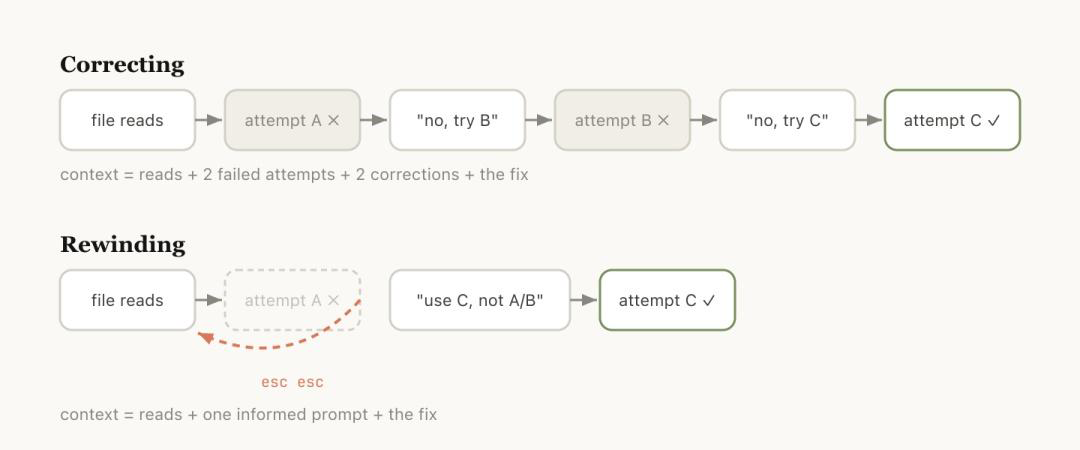
The official team also mentioned a supporting usage: use “summarize from here” or /rewind to let Claude first summarize the lessons learned from the mistakes into a handoff message, then rewind and run the task again with that handoff. It’s like letting Claude leave a note for its future self.
I used to underestimate the value of this action. The double Esc operation is so unobtrusive that many people don’t even realize it exists—but it can save you a lot of time and improve the model’s performance significantly.
3.Clear: Write Your Own Brief and Start a New Session
The official team gave a simple principle: when starting a new task, start a new session.
This rule sounds easy, but it’s often hard to follow due to laziness. For example, you might be working in the same terminal, finish refactoring the backend, and then start writing documentation—so you just continue using the same Claude session.
The problem is that writing documentation doesn’t require the implementation details of the backend interfaces. Carrying that context forward only uses up more context space without any real benefit.
The purpose of /clear is to let you write the important information into the prompt yourself. For example, “We are refactoring the auth middleware with constraints X, relevant files are A and B, and we have ruled out solution Y.” This message becomes the starting point of the new session.
It’s more work than compact because you have to type the brief yourself. But in return, you get a clean context that you personally filtered.
Here’s how I use it: I always use /clear for new tasks, unless I clearly know that the file reads from the old context are still useful for the new task—for example, writing tests right after implementing a function. In that case, I just continue the session.
4.Compact: Convenient but Lossy, Best Triggered Manually
The principle of /compact is to let the model summarize the previous conversation and replace the original history with that summary. This action is lossy, but you don’t have to write anything yourself. You can also add a hint to guide it—for example, “/compact focus on the auth refactor, drop the test debugging”—to tell it what to focus on and what to discard.
The official team explained why auto-compact sometimes fails. The core reason is: when the model compacts the context, it doesn’t know what you’re going to do next.
They gave a specific scenario: after a long debugging session, auto-compact is triggered, and the summary focuses on the key points of the debugging process. Then you type, “Now fix another warning in bar.ts.” But that warning was something you mentioned casually earlier, and it wasn’t discussed much in the debugging session—so it’s likely to be discarded as irrelevant information during the compact.
Adding to the context rot issue we discussed earlier, auto-compact is triggered when Claude’s attention is already涣散. It’s like asking someone who’s already distracted to decide what’s important and what’s not—of course, it will go wrong.
Once you turn off auto-compact, you have to judge when to trigger /compact manually. The advantage of the 1M context window is that you have more time to compact proactively before problems occur. Moreover, proactive compacting allows you to add hints to guide Claude on what to keep.
5. Subagents: Use Only When You Need a Final Summary
I’ve written a tutorial specifically about using subagents before, so here I’ll only focus on the key tip from the official blog.
The official judgment standard is simple: Will you need the intermediate outputs of this tool again, or do you only need the final conclusion?
If you only need the final conclusion, use a subagent. If you still need the intermediate outputs, don’t use one.
For example, if you ask Claude to search for keywords in a large codebase and summarize the results, this process will generate a lot of intermediate read records. These records are useless to you—you only need the final summary. In this scenario, a subagent is perfect: it uses its own new context window to complete all the work and only brings back the conclusion.
The official team provided several prompts you can directly copy and use:
-
Spin up a subagent to verify the result of this work based on the following spec file
-
Spin off a subagent to read through this other codebase and summarize how it implemented the auth flow, then implement it yourself in the same way
-
Spin off a subagent to write the docs on this feature based on my git changes
It’s important to note that after the Opus 4.7 update, the default behavior for subagents is much more restrained than in 4.6. Many scenarios where subagents would automatically open before no longer do so. I also mentioned this specifically in yesterday’s article.
So in Opus 4.7, if you know a task is suitable for a subagent, it’s best to clearly state it in the prompt—don’t rely on Claude to judge automatically.
Final Tips for Managing 1M Context Effectively
-
Avoid context rot by managing your session proactively—don’t wait for the model to become distracted.
-
Use Continue when the context is still useful, Rewind to fix mistakes cleanly, Clear for new tasks, Compact manually with hints, and Subagents for tasks that only need a final conclusion.
-
Turn off auto-compact to avoid accidental data loss, and compact manually when you know what to keep.